Synced video + audio in one scene
The M-MEDIA P1 capstone. Video frames and an audio histogram render
in the same wisp scene, anchored to a single MediaClock. Every
seam shipped in M-MEDIA.0 through M-MEDIA.13 shows up at the same
call site:
MediaClock::manual(M-MEDIA.2) drives the timeline.VideoFrame(M-MEDIA.12) uploads BGRA to a wispVideoTexture.SineWaveSource→AudioChunk→quantize(M-MEDIA.8) produces the histogram.mono_bars(M-MEDIA.9) lays the histogram out as rectangles.wisp::Graphicsandwisp::Spritedraw both layers in one pass.
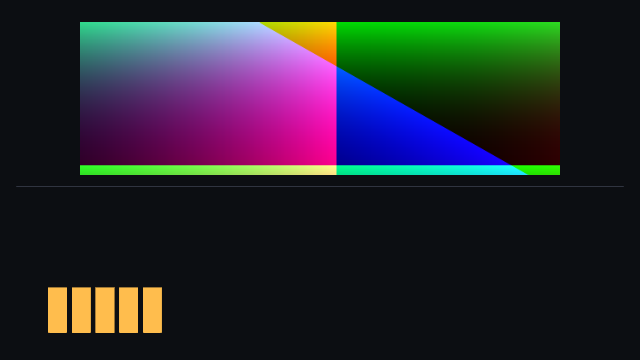
Frame 5 of 10. Video occupies the top half (a hue-rotating gradient
that changes per frame); audio bars sit on the bottom (amber, scaled
to the chunk's peak). The amplitude ramps 0.30 → 0.90 over the run,
so bar heights grow monotonically frame-to-frame.
Per-frame loop
sequenceDiagram
    participant Clk as MediaClock::manual
    participant Aud as SineWaveSource + quantize
    participant Vid as synth_frame_bgra + VideoTexture
    participant Stg as wisp::Stage
    participant Out as PNG

    loop frame i ∈ [0, 10)
        Clk-->>Aud: t = clock.now()
        Clk-->>Vid: same t
        Aud->>Stg: histogram → mono_bars → Graphics rects
        Vid->>Stg: BGRA upload → Sprite
        Stg->>Out: renderer.render_stage → read_pixels → PNG
        Clk-->>Clk: clock.advance_by(100ms)
    end
The example doesn't try to generate audio at the video's exact
PTS — it constructs a fresh AudioChunk per frame, anchored at
clock.now(), and quantizes it. Real captures (live mic + webcam,
M-MEDIA.15/.16) emit chunks with their own PTS; the recorder code
will pick the chunk whose window contains clock.now(). Either way,
the clock is the single source of truth — video and audio
align against the clock, not against each other.
Run
cargo run -p media --example synced_scene
frame 00: video.pts = 0.000 s | hist.window = [0.000 s, +20 ms ×  5 bars] amp=0.30 peak=0.300 rms=0.214
frame 01: video.pts = 0.100 s | hist.window = [0.100 s, +20 ms ×  5 bars] amp=0.37 peak=0.367 rms=0.261
…
frame 09: video.pts = 0.900 s | hist.window = [0.900 s, +20 ms ×  5 bars] amp=0.90 peak=0.900 rms=0.642
Ten 640×360 PNGs land under target/synced-scene/frame_NN.png.
Reproducibility
Synthetic sources only. Every byte of every PNG is determined by
constants in examples/synced_scene.rs — FRAME_PERIOD,
BUCKET, the amplitude ramp, the hue-rotation step. Run it on
two machines with the same GPU and you'll get bit-identical
output. That's what makes this example viable as both a
manual-regression artifact and a future snapshot test.
Manual regression
| Field | Expected |
|---|---|
| frame count | 10 PNGs at target/synced-scene/frame_NN.png |
| video.pts cadence | 0.000, 0.100, …, 0.900 s (100 ms steps) |
| hist.window stride | always +20 ms, 5 bars per window |
| amp ramp | 0.30 → 0.90 linearly, peak ≈ amp, rms ≈ amp / √2 |
| visual | video changes color frame-to-frame; bars grow monotonically |
What this unlocks
Live capture (M-MEDIA.15 / .16) swaps the synthetic sources for real hardware-backed ones without changing the wisp side of the call. Editor-UI integration (M-MEDIA.21) wires the same composition into the Tauri shell. The scene shape doesn't change — only the data sources do.